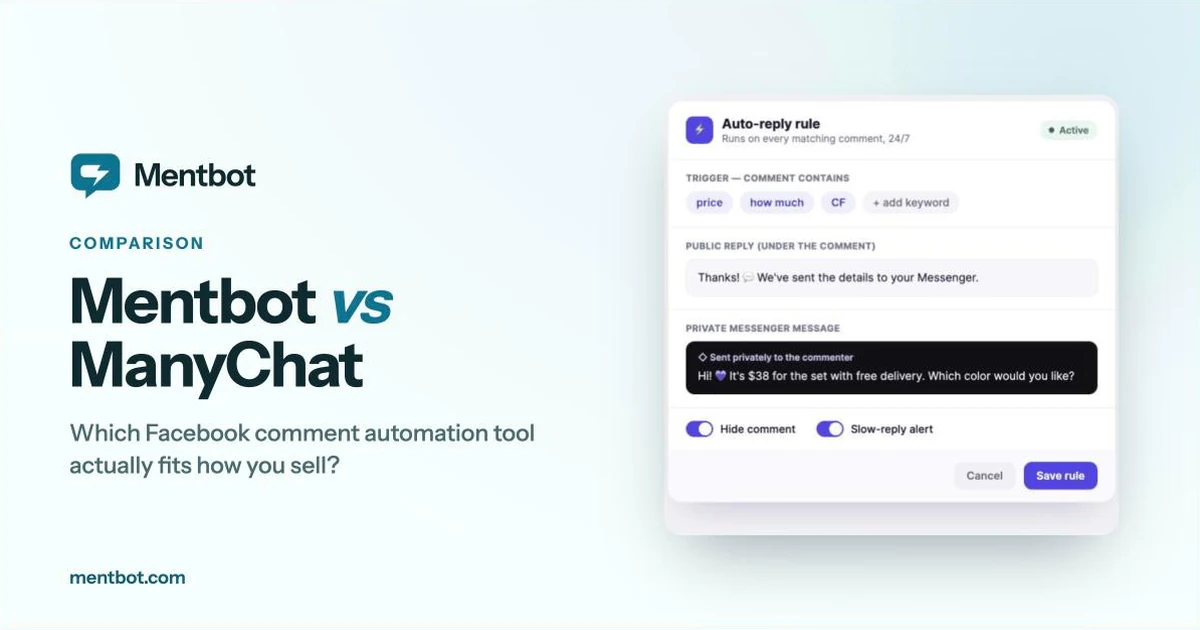
On 2 March 2026, ManyChat introduced a new pricing model: five tiers, a free plan capped at 25 active contacts, and paid plans that bill by the number of people who interact with you each month. The complaint in ManyChat’s own community forum wasn’t really about the free tier. It was about the model — your bill grows with the size of your audience, whether or not you’re doing anything more with them.
One thing to check before you shop around: ManyChat’s help centre says the new plans go by default to accounts created on or after 2 March 2026, and that older accounts are being moved onto the model country by country, with an email when your turn comes. Free accounts have already been migrated, including ones opened before that date. So if you signed up earlier, look at your own billing page before assuming your costs are about to jump. Checked against Manychat Help — Essential plan and Free plan, 21 September 2026.
Either way, the comparison below is built around the thing that actually decides your bill — what you’re charged for — rather than feature checklists.
A note on honesty, and on the order. We build Mentbot, and we have put it first. That is a publisher’s choice, not a verdict, so here is what holds the rest of the page up. Every price comes from the vendor’s own pricing page or help centre, checked on 21 September 2026. Every competitor entry carries a Compared to Mentbot line naming what they do that we don’t. Two of the seven beat Mentbot for most people who land here — Meta’s free tool at low volume, ManyChat if you use flows — and both say so in their own entry. Mentbot is a young product with no customer reviews to point at; nothing below rests on popularity.
Four ways these tools charge, and the difference between them is thousands of dollars a year at scale:
| Model | What grows your bill | Who it hurts |
|---|---|---|
| Per active contact | Every unique person who interacts with you in a month | Anyone whose posts occasionally go viral |
| Per profile / per seat | Number of social profiles and team members | Agencies and multi-page sellers |
| Flat by comment volume | Comments handled per day or scanned per month | Nobody, until one post outgrows your tier |
| Free | Nothing | Nobody — but you get what you pay for |
A concrete example. ManyChat’s Essential plan is $17/mo on monthly billing ($14/mo if you pay for the year up front) and includes 250 active contacts, after which each extra contact costs $0.10. One product post that pulls 2,000 commenters puts you 1,750 contacts over — $175 in overage on a $17 plan. ManyChat warns you as you approach the limit and lets you set an overage cap, but capping it means capping your own leads to control your bill.
One caveat on every price in this post: most vendors advertise the annual-billing rate in large type and the monthly rate in small type, and two of them are running promotions right now. Where the rates differ, we give both.
That’s the trade the rest of this list is really about.
Price: $9/mo (100 comments a day) to $49/mo (5,000 a day), flat, 20% less on annual billing. Every feature on every plan, unlimited Facebook pages. Every signup starts on a 14-day Pro trial, free, no card.
We built Mentbot for one motion: someone comments, they get a public reply and a private Messenger message, and then the comment can be hidden so your competitors can’t work through your buyer list. Setup is one rule covering every future post — all comments, comments on posts carrying a hashtag, or comments containing your keywords — rather than a flow attached to each post. A reply-once switch stops the same person collecting the same reply twice under one post, and a finished rule copies onto another page in a click. If you want the mechanism underneath the public-plus-private pair — Meta’s one-private-reply-per-comment rule, and why the public half matters as much as the DM — our explainer on how comment-to-DM actually works covers it.
The billing is by daily comment volume, not by contacts, so a post going viral spends that day’s allowance and resets. It doesn’t move you up a tier or generate an overage bill.
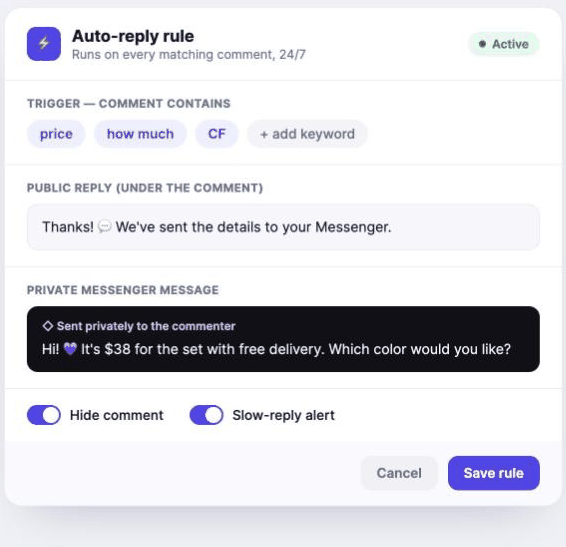
Where it falls short: a daily cap has a hard edge — comments past the day’s limit are skipped rather than billed, so size your tier against your biggest day, not your average one. There is no visual flow builder, no drip sequences, and no AI. Facebook pages and Instagram only: no WhatsApp, no TikTok. And we are new enough that there are no customer reviews to read. If any of that matters to you, one of the six below is the better buy.
Choose it if: you sell in Facebook comments daily — product posts, live selling, fifty “how much?” a day — and you want the public-reply-plus-DM-plus-hide sequence running without building or maintaining anything. If it’s the DM half you care about, our guide to automating the private message to everyone who comments compares that one motion across Mentbot, ManyChat and Meta’s free tool.
Price: Free, forever, no tier games.
Facebook’s own tooling can send a private Messenger reply to comments on your posts that contain specific keywords or phrases. It’s the Comment to message automation in Inbox → Automations, it’s desktop only — keyword automations don’t exist in the mobile app — and it takes about ten minutes to set up. Separately, your Page settings let you block comments containing words you choose, free. Checked against Meta’s Business Help Centre and the Blocking and moderation help pages, 21 September 2026.
Two things the help page says that are easy to miss: custom automations are prioritised over the templated ones, and turning on Meta Business Agent pauses any existing automations you have, including away messages and instant replies.
Where it falls short: nothing in Meta’s list of automations posts a public reply, and there’s no reporting, so you’ll never know how many commenters it converted. The help page also doesn’t say whether the automation can be limited to specific posts, so test it on a post of your own before relying on it.
Compared to Mentbot: it sends the private message and nothing public, and it gives you no count of what it did; Mentbot’s motion is public reply plus DM plus hide, with a 7-day application count and success rate per rule. But Meta’s costs nothing, and that beats $9 when your volume is ten comments a day.
Choose it if: you get a handful of comments a day and you’re not sure automation is worth paying for yet. Genuinely start here. If it’s enough, you’ve saved yourself a subscription; if it isn’t, you’ll know precisely which limit you hit. Our Meta Business Suite comparison lists exactly what the free tool automates and what it doesn’t.
Price: Business lists at US$69/mo billed monthly, with yearly billing 10% less. The page is currently running a limited offer until 30 September: US$20/mo billed monthly, or US$216 for the year. Agency S is US$90/mo billed yearly (US$1,080/year) and covers 3 companies. Every plan includes US$20 of AI credits a month and starts with a free trial; there is no free plan. Verified against chatfuel.com/pricing on 21 September 2026.
Chatfuel is one of the oldest Messenger bot builders and remains the most direct substitute for ManyChat: visual flow builder, Instagram + Facebook + WhatsApp, shared inbox, templates, CRM and Stripe integrations. It’s an official Meta partner, as is ManyChat. The Business plan’s own feature list includes replying to post comments and to Reels comments automatically.
The more interesting difference is what it doesn’t meter. Chatfuel’s usage-limits page states that plans include unlimited active contacts and unlimited messages, and that keyword replies, button flows and broadcasts are unlimited regardless of volume — the fair-use allowance applies to AI processing only. If per-contact billing is the reason you’re reading this, that’s the single most relevant fact on this page.
Where it falls short: there’s no free plan to grow out of, and the metering moved to AI rather than disappearing — exceed the fair-use AI allowance and the same page says your bot pauses until you renew, wait out the billing period, or supply your own OpenAI key. It’s also a broad platform, so you’re learning a flow builder either way: you’re swapping vendors, not swapping approaches.
Compared to Mentbot: Chatfuel covers WhatsApp, has the flow builder and the AI that Mentbot doesn’t, and doesn’t count your contacts — three real advantages. Against that, its plan page lists automatic comment replies but no comment hiding, so check that before switching if hiding is why you’re here, and at list price it’s US$69/mo against Mentbot’s $9–$49.
Choose it if: you want everything ManyChat does without contact-based billing, and you’re comfortable with a flow builder. If Chatfuel itself is the one you’re weighing leaving, our dedicated Chatfuel alternatives comparison goes deeper on that specific choice, and if it’s these two specifically you’re deciding between, our ManyChat vs Chatfuel head-to-head puts the pricing and features side by side.
Price: Starter $29.99/mo (up to 1,000 comments scanned a month), Growth $79.99/mo (5,000), Pro $149.99/mo (25,000). Unlimited Facebook pages and team members on every plan. 7-day free trial, no card. Verified against mycomments.io on 21 September 2026.
This one is built for paid social rather than for organic selling. It hides spam, profanity, negativity and competitor links on Facebook and Instagram posts and ads, with an AI sentiment engine that the site says catches toxic intent when no blocked keyword is present, plus a unified comment inbox across campaigns. Auto-DM and the AI intent engine are listed on the Pro plan.
Where it falls short: the comment-to-DM half — the thing this whole article is about — is a Pro-plan feature at $149.99/mo, and the meter is comments scanned per month, so ad campaigns that pull heavy comment volume climb the tiers quickly.
Compared to Mentbot: it covers ad comments, which Mentbot doesn’t, and its moderation is AI-driven where Mentbot’s is keyword and hashtag rules you write. But the auto-DM Mentbot includes on its $9 plan sits on MyComments’ $149.99 tier, and its entry plan scans 1,000 comments a month where Mentbot’s entry plan handles 100 a day.
Choose it if: you run Facebook and Instagram ads and the problem is what’s in the comment section under them, not what you can sell through it.
Price: Standard $89/mo on monthly billing ($79 billed yearly), Pro $109/mo ($89 yearly), Expert from $119/mo billed yearly, Enterprise from $465/mo. Those entry rungs carry 2 users and 5 profile slots; the Expert card, preset to 5 users, 10 profile slots and 25K inbox capacity, prices at $209/mo yearly or $249/mo monthly, and past 60 profiles you contact sales. Prices exclude VAT: EU businesses without a valid tax ID, Polish companies and private individuals pay 23% on top. 14-day free trial based on the Expert plan, no card. Verified against napoleoncat.com/pricing, 21 September 2026.
NapoleonCat is a social media management suite — scheduling, analytics, a unified inbox across Facebook, Instagram, TikTok, LinkedIn, YouTube, X and Google Business Profile — with auto-moderation as a headline feature. It covers Facebook, Instagram and TikTok ad comments as well as organic ones, which most tools on this list don’t.
Read the tier table carefully, though. Automatic comment hiding and deletion is listed on the Expert plan, not on Standard or Pro. If auto-hiding is the feature you came for, Expert’s from-$119/mo is the real price, not the $79 on the front of the pricing page.
Where it falls short: cost, if comments are all you need. You’re buying a scheduling and analytics suite to get the moderation, and the price steps up with users, profile slots and monthly inbox capacity, so a busy inbox or an extra brand can move you up a tier.
Compared to Mentbot: NapoleonCat moderates ad comments across three networks and adds sentiment analysis and scheduling, none of which Mentbot has. The catch is where the features sit: automatic hiding is on Mentbot’s $9 plan and on NapoleonCat’s Expert tier, and NapoleonCat prices seats and profile slots where Mentbot gives every plan unlimited pages.
Choose it if: you manage several brands or platforms, you run Facebook and Instagram ads and need the comments underneath them moderated, or you’re an agency reporting to clients. For those jobs it’s well-priced. For “I sell things in my comments”, it isn’t. Our NapoleonCat alternative page prices it at 100, 1,000 and 3,000 comments a day.
Price: Starter $99/mo, Growth $199/mo, Advanced $349/mo on monthly billing ($79 / $159 / $279 billed yearly), plus a custom Enterprise tier. The pricing page meters monthly active contacts — it asks how many contacts you talk to each month before it shows you a plan. 7-day free trial, no card. Verified against respond.io/pricing, 21 September 2026.
respond.io is an omnichannel conversation platform: WhatsApp, Messenger, Instagram, TikTok, email, SMS and web chat into one team inbox, with routing, assignment, AI agents and a CRM layer. Comment-to-DM capture is one entry point among many.
Where it falls short: the price, if comments are the whole job. The $99/mo entry ($79 billed yearly) is eleven times Mentbot’s $9 and nearly six times ManyChat’s Essential — because you’re buying a support and sales operation, not a comment tool. A solo seller won’t use most of it.
Compared to Mentbot: respond.io gives you routing, assignment, multiple workspaces, AI agents and six more channels; Mentbot has one channel, no seats and no routing. It also meters monthly active contacts, which is the billing model most people reading this page are trying to leave.
Choose it if: you have multiple agents handling conversations, you need routing and assignment, and conversations arrive from more places than Facebook comments. It’s the natural upgrade when your team outgrows a shared login. Our respond.io comparison covers what its Facebook comment feature does and doesn’t do.
Price (monthly / annual): Free — $0, 25 active contacts, up to 4 live automations, any 2 channels, 1 user, “Powered by Manychat” on your first message. Essential $17 / $14 (250 contacts). Pro $39 / $29 (2,500). Business $99 / $69 (7,500). Advanced $199 / $139 (25,000). Extra contacts run $0.10 down to $0.004 each depending on tier, on monthly billing. AI is included from Pro up, not sold as an add-on. Verified against manychat.com/pricing, 21 September 2026.
We should be fair here: ManyChat has the best visual flow builder in the category, an enormous template library, a decade of agencies and courses around it, and official Meta partnership across Instagram, Facebook, WhatsApp and TikTok. None of the smaller tools on this list come close on ecosystem.
The free plan is a sandbox rather than a usable plan — one Reel with a keyword trigger can exhaust 25 contacts in an afternoon. But the paid plans didn’t get worse in features. They got more granular in billing, which is a problem only if your audience grows faster than your revenue from it.
Compared to Mentbot: ManyChat does a long list of things Mentbot has never built — flows, broadcasts, AI replies, TikTok, WhatsApp, SMS, email, a team inbox with seats. The one real difference in Mentbot’s favour is the meter: ManyChat charges for the people who interact with you, Mentbot for the comments it handles in a day. If you use the flows, ManyChat wins this comparison outright and you should stay.
Stay on ManyChat if: you use the flows. If your automation is “comment WORKSHOP → get the PDF → three-message sequence → book a call”, nothing else here does that as well, and switching to save $20/mo would cost you the thing you’re actually paying for. Our head-to-head with ManyChat works through that choice in detail.
Leave if: you only use the comment trigger. You’re paying for a flow builder you don’t open, on a billing model that punishes exactly the posts you want to have.
Search “ManyChat alternatives” and you’ll meet a dozen names you’ve never heard of, most of them from 2025–2026, most of them priced flat. Several look genuinely reasonable, and flat pricing is the right instinct. Where we’ve priced one against its own site, there’s a page: CommentGuard, ReplyZen, Chatrace and SendPulse, each with the date the prices were checked.
Two cautions, offered as a competitor who’d benefit from you distrusting all of them — so weigh it accordingly:
Most of the listicles ranking them are written by the tools themselves. A post titled “15 best ManyChat alternatives” that happens to rank its own product first is an ad. That includes this one, which is why the price in every entry above links to the vendor’s own page and carries the date we read it. Click them.
Check the API question before you pay. Anything automating Facebook comments should work through Meta’s official Pages API with permissions you grant in a Facebook login screen. Tools that ask for your Facebook password, or that run as browser extensions clicking buttons on your behalf, put your page at risk of restriction. This is the single check worth doing on any tool here, ours included.
| Tool | Entry price (monthly) | Billing model | Free option | Best for |
|---|---|---|---|---|
| Mentbot | $9 | Flat, by comments a day | 14-day trial, no card | Selling in Facebook comments |
| Meta Business Suite | Free | — | Unlimited | Low volume, testing the idea |
| Chatfuel | $69 list ($20 on a promo to 30 Sept) | Flat; unlimited contacts, fair-use limits on AI | Free trial | ManyChat’s features, no contact metering |
| MyComments.io | $29.99 | Comments scanned per month | 7-day trial, no card | Ad comments and Instagram moderation |
| NapoleonCat | $89 (auto-hide from $119 yearly) | Users, profile slots, inbox capacity | 14-day trial, no card | Multi-platform moderation, agencies |
| respond.io | $99 ($79 annual) | Plan tier plus monthly active contacts | 7-day trial, no card | Teams with an omnichannel inbox |
| ManyChat | $17 ($14 annual) | Per active contact | Free, 25 contacts | Multi-step flows and campaigns |
All prices verified against vendor pricing pages and help centres on 21 September 2026, stated at the monthly rate unless marked, and excluding tax — NapoleonCat and ManyChat both say tax is added at checkout. Check before you buy: this category re-prices often, as March demonstrated.
Answer one question: what do you do after the comment?
Most people asking about ManyChat alternatives are in the first group and paying for the second. That’s the whole finding.
Is ManyChat still free in 2026? There is still a free plan. Under the model introduced on 2 March 2026 it covers 25 active contacts per month, up to 4 live automations, 2 channels and 1 user, with ManyChat branding on the first message you send — enough for testing, not for running a page. ManyChat’s help centre says every free account has already been moved onto it, including accounts opened before that date, while paid accounts from before March are being migrated country by country.
What is an “active contact”? ManyChat counts any unique person you interact with during a monthly billing period — one person equals one contact regardless of how many messages you exchange, and a contact becomes active through automations, AI, broadcasts or the inbox. This is why viral posts are expensive on contact-based billing: every commenter you reply to is billable, whether or not they ever reply.
Which is cheapest for a small Facebook seller? Meta Business Suite, at zero. Among paid tools on this list, Mentbot at $9/mo — with the honest caveat that it only does Facebook comments, so “cheapest” is only meaningful if that’s all you need.
Can I move my Messenger conversations to a new tool? Your conversation history belongs to your Facebook page, not to the tool, so it stays put when you switch. Disconnect the old tool’s triggers before connecting a new one, or both will fire private replies on the same comments.
Is any of this against Facebook’s rules? Private replies to comments are an official Page feature, and every tool here works through Meta’s API. What breaks the rules is unofficial browser scripts and anything asking for your account password — that’s what gets pages restricted.
If you’re leaving ManyChat because of the billing rather than the features, don’t replace a flow builder with another flow builder. Work out what you actually do after a comment arrives, then buy only that.
If the answer is “reply, DM them, hide the comment, and let a human close it”, that’s the job Mentbot was built for — 14-day free trial, no card, and you can compare a week of Messenger conversations against your last week on ManyChat before deciding. The full auto-reply setup guide covers the free Meta option in detail if you’d rather start there, and for the wider field beyond ManyChat and Chatfuel, our roundup of the best Facebook auto-reply tools compares six options on the same verified-pricing basis.