Your Chatfuel flow for last month’s restock post still has twelve blocks in it: a welcome message, a menu, three conditional branches for people who typed the keyword wrong, and one block near the bottom nobody remembers building. It works. It also took forty minutes to put together, for a post that gets replaced by tomorrow’s photo.
That’s not a complaint about Chatfuel — the flow builder does exactly what it’s built to do. It’s a complaint about using a flow builder for a job that’s really just “reply to the comment, send the price in Messenger.” If that’s the whole job on your page, you’re maintaining infrastructure you don’t need.
A note on honesty: we build Mentbot, which is #2 on this list. Every price below comes from the vendor’s own pricing page, checked on 21 August 2026 and re-checked on 15 September 2026, and we say plainly where Chatfuel or a competitor is the better fit. Chatfuel is a genuinely strong product for what it’s built for — we explain exactly when to stay on it.
Chatfuel doesn’t bill per contact, which is a real strength worth saying plainly — it’s the thing ManyChat switchers often assume every tool in this category does, and Chatfuel simply doesn’t. Chatfuel’s plan limits page says every plan includes unlimited active contacts and unlimited messages; the limit applies to AI processing instead, as a fair-use allowance per billing period (limits.chatfuel.com, checked 15 September 2026).
Business costs $69/month billed monthly, or 10% less billed yearly, with US$20 of AI credits a month. The pricing page no longer lists a free plan — every plan starts with a free trial instead — and the only other tier is Agency S, at $100/month, for agencies running several client businesses.
The catch is what’s bundled into that $69: a visual flow builder, AI that qualifies leads and sells in the chat, bulk WhatsApp campaigns, CRM sync and ad-attribution tracking — a full chatbot platform. If a public reply and one Messenger DM is the entire job on your page, you’re paying platform price for a stack of features you never open. It’s a different mechanism from ManyChat’s per-contact billing, but the same underlying complaint: the bill is sized for the platform, not the job.
One thing worth checking before you commit to the annual plan: the pricing page lists US$20 of AI credits a month and says “usage limits apply”, but neither it nor the separate limits page says how many AI replies that covers. The limits page does say what happens when you run out: your bot pauses and the AI stops replying until the limit resets, unless you renew early or connect your own OpenAI API key. If “unlimited everything” is the reason you’re paying for Business, read that page first.
Price: Free, forever.
Facebook’s own tool sends a private Messenger reply when a comment contains the words or hashtags you set, from the Comment to message automation in Inbox → Automations on desktop — about ten minutes to set up. Separately, a word list and profanity filter in your Page’s Settings, under Followers and public content, can hide comments automatically, free.
Where it falls short: there’s no public-reply component and no reporting — you won’t know how many commenters it converted. Meta’s help pages don’t say whether the automation can be limited to specific posts, and they disagree on keywords versus hashtags, so test it on your own post first. Checked against Meta’s Business Help Center, 15 September 2026.
Choose it if: you get a handful of comments a day and aren’t sure paid automation is worth it yet. If it’s enough, you’ve saved a subscription; if it isn’t, you’ll know exactly what limit you hit. Our walkthrough of the three ways to DM a commenter automatically has the four setup steps for this one, and the paid routes to the same result. For a feature-by-feature view, see our Meta Business Suite comparison.
Price: $9/mo (100 comments/day) to $49/mo (5,000/day), flat, by daily comment volume — not by contact, not by AI usage. Every feature on every plan, unlimited pages, 14-day free trial, no card.
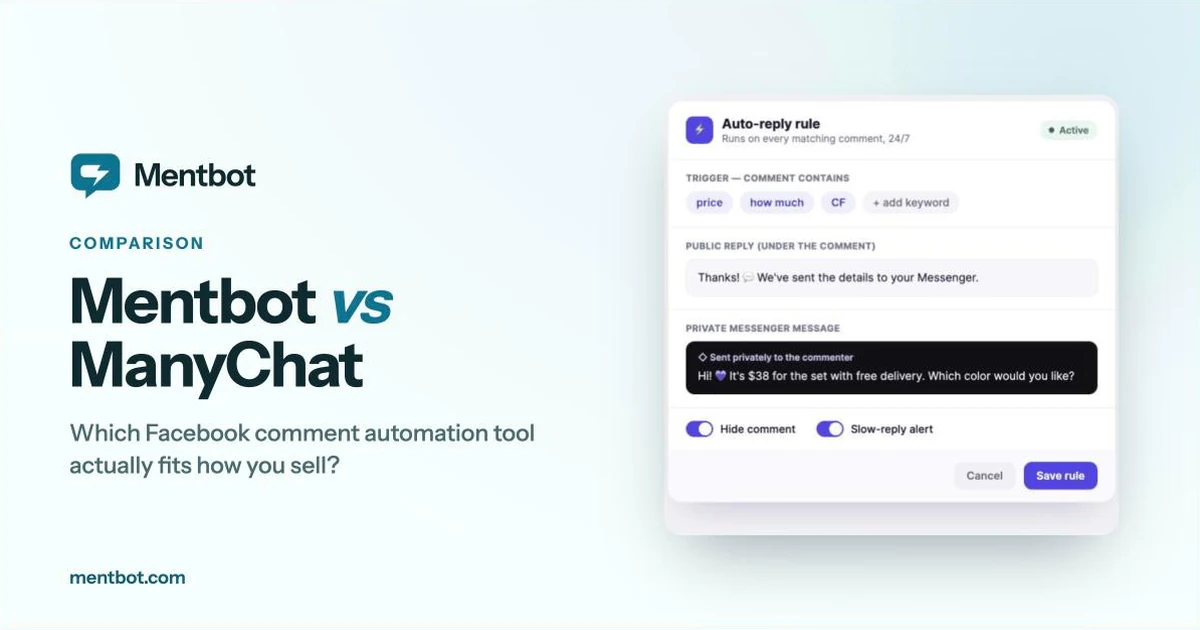
Where Chatfuel gives you a flow builder to configure, Mentbot gives you one rule: someone comments, they get a public reply and a private Messenger message within a second, and the comment can be hidden so competitors can’t work through your buyer list. Set it once — all posts, posts with a hashtag, or comments containing your keywords — and it covers every future post with no per-post setup, no blocks, no branches. Both halves ride on the same Meta private-reply feature Chatfuel’s comment-growth tools use — one private message per comment, within 7 days — and if you want that mechanism explained before the pricing, Comment-to-DM: How It Actually Works is the short version.
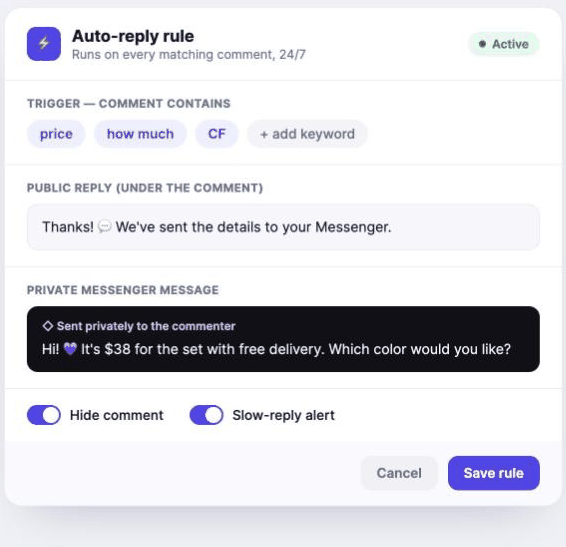
Where it falls short: no visual flow builder, no drip sequences or broadcasts, no WhatsApp (Facebook pages and Instagram only), and no AI sales manager. If any of those are why you’re on Chatfuel, stay on Chatfuel.
Choose it if: the flow you built was always doing the same two things — reply, then DM — and you’d rather set that once than maintain it. Our step-by-step auto-reply setup guide walks through exactly what that setup looks like.
Price (monthly / annual): Free — 25 active contacts. Essential $17 / $14 (250 contacts). Pro $39 / $29 (2,500). Business $99 / $69 (7,500). Advanced $199 / $139 (25,000). Overage from $0.10 down to $0.004 per extra contact depending on tier. Prices checked against ManyChat’s pricing page on 15 September 2026.
If what you actually want from Chatfuel is the flow builder — multi-step sequences, quizzes, drip campaigns — and you’re only considering a switch because of Chatfuel’s price, ManyChat is the direct like-for-like swap, not a comments-only tool. It has the largest template library and agency ecosystem in the category.
Where it falls short: unlike Chatfuel, ManyChat bills by active contact, so a viral post that pulls thousands of commenters can push you into overage or a higher tier. Chatfuel’s unlimited-contacts model is the thing you’d be giving up.
Choose it if: you want Chatfuel’s kind of flow builder but on a different vendor, and contact-based billing doesn’t worry you at your volume. We’ve compared seven ManyChat alternatives on verified pricing and done a full Mentbot vs ManyChat breakdown if you want the deeper version of that specific choice, and our ManyChat vs Chatfuel head-to-head puts these two directly side by side.
Price: Business $69/mo, or 10% less billed yearly. Agency S $100/mo ($90/mo billed yearly). No free plan listed; every plan starts with a free trial. Unlimited contacts and messages on both, with a fair-use limit on AI. Verified against chatfuel.com/pricing, checked 15 September 2026.
Being fair to the tool this post is about leaving: Chatfuel is one of the most established Messenger bot builders, an official Meta partner, and its unlimited-contact model is genuinely better than per-contact billing if your page ever has a post go viral. The flow builder covers Facebook, Instagram, and WhatsApp in one place, and the AI that qualifies leads and sells in the chat is real capability, not filler.
Stay on Chatfuel if: you’re actually using the flow builder — multi-step sequences, lead qualification, an AI agent answering product questions across channels. Switching to a comments-only tool to save $20–60 a month would cost you the thing you built Chatfuel for in the first place.
Leave if: the flow you built only ever does “reply, then DM,” and WhatsApp was never in the picture. That’s a comments tool wearing a chatbot platform’s price tag.
Search “Chatfuel alternatives” and you’ll find a wave of smaller, newer tools priced flat rather than per contact or per platform. Flat pricing is the right instinct if comments are your whole job.
Two cautions, offered as a competitor who’d benefit from you distrusting all of them, so weigh accordingly:
Most of the listicles ranking these tools are written by the tools themselves. A “best Chatfuel alternatives” post that ranks its own product first is an ad — this one included. The difference we can offer is that every price above came from the vendor’s own pricing page, not from another listicle.
Check the API before you pay. Anything automating Facebook comments should run through Meta’s official Pages API with permissions you grant in a Facebook login screen. Tools asking for your Facebook password, or browser extensions clicking buttons on your behalf, put your page at risk of restriction — the one check worth doing on any tool here, ours included.
| Tool | Entry price (monthly) | Billing model | Free option | Best for |
|---|---|---|---|---|
| Meta Business Suite | Free | — | Unlimited | Low volume, testing the idea |
| Mentbot | $9 | Flat, by daily comments | 14-day trial | Selling in Facebook and Instagram comments only |
| Chatfuel | $69 (10% off yearly) | Flat; unlimited contacts, AI usage limited | Free trial | Multi-channel flows, AI agent |
| ManyChat | $17 ($14 annual) | Per active contact | 25 contacts | Multi-step flows and campaigns |
All prices verified against vendor pricing pages on 21 August 2026 and re-checked on 15 September 2026, stated at the monthly rate unless marked. This category re-prices without warning — check before you buy.
Most people searching for a Chatfuel alternative aren’t unhappy with the flow builder. They’re paying for it and not using it. Answer one question: are you building a flow, or handling a comment?
Is Chatfuel free in 2026? Not on its current pricing page. In August it listed a free Chatfuel Light plan; on 15 September it listed no free plan, only a free trial on every plan. Business — flow builder, AI lead qualification, bulk campaigns — is $69/month, or 10% less billed yearly. Source: chatfuel.com/pricing, checked 15 September 2026.
Does Chatfuel charge by contact like ManyChat? No. Chatfuel’s plans include unlimited contacts and messages; the fair-use limits apply to AI processing, not audience size. That’s Chatfuel’s real advantage over ManyChat for anyone with unpredictable, viral-prone posts.
Which is cheapest for a small Facebook seller doing comments only? Meta Business Suite, at zero. Among paid tools, Mentbot at $9/month — the honest caveat being it’s Facebook and Instagram comments only, so “cheapest” only matters if that’s the whole job.
Can I move my Messenger conversations from Chatfuel to a new tool? Conversation history belongs to your Facebook page, not to Chatfuel, so it stays put when you switch. Turn off Chatfuel’s comment-growth triggers before turning on a new tool’s, or both will try to reply to the same comment.
Is switching away from Chatfuel against Facebook’s rules? No. Every tool named here works through Meta’s official Pages API with permissions you grant. What breaks the rules is unofficial browser scripts and anything asking for your account password.
If you’re leaving Chatfuel because of the price rather than the flow builder, don’t replace one platform with another platform. Work out what actually happens after a comment lands on your page — if the honest answer is “reply, DM, maybe hide it,” that’s the job Mentbot was built for.
Start a 14-day free trial — no card required — and run it against your next product post before deciding. If you’re also weighing ManyChat, our ManyChat alternatives comparison covers that side of the market on the same verified-pricing basis, and our roundup of the best Facebook auto-reply tools compares six options across the wider category.