
Why didn't Mentbot reply to this comment?
On this page
Usually Auto replies was off for the Page, or no Rule matched the comment. For any one comment, the line under No reply sent says why: see Find the reason. Then answer the skipped comments with Bulk reply.
Auto replies are off
How to tell: Auto replies are off for this page. With the Page’s switch off, no Rule runs. This is the most common reason: about two thirds of skipped comments across all Pages from 20 Sep to 20 Oct 2026.
- Open Pages and choose the Page.
- Switch Auto replies to On.
- Answer what came in while it was off: Catch up with Bulk reply.
No Rule matched the comment
How to tell: one of these.
- Text matched no keywords: the comment contains none of your keywords. See How keywords match.
- Required hashtag missing: the post doesn’t carry the Rule’s hashtag. The comment’s hashtags don’t count.
- Post is not in the rule’s list: the Rule answers only its chosen posts, and this is another one.
- No rules on this page yet: the Page has no Rule.
- Rule is off: the Rule that matched is switched off.
- Open Pages, choose the Page, and press Edit on the Rule, or Add rule for a new one.
- Add the words your customers use, the hashtag or the post, or switch the Rule on.
- To answer every comment no other Rule catches, add an Every comment Rule: see The Default reply.
- Press Save settings. New comments get the reply. For the ones already skipped, use Write one message in Bulk reply.
The daily limit ran out
How to tell: Daily quota reached. The Page runs on the plan of its Billing Owner, the Member marked pays in Page settings. That plan’s daily limit covers all its Pages and Instagram accounts together. It resets every day at 23:59 Bangkok time (16:59 UTC), the same moment for every account. The dashboard shows that time in your own time zone.
- Wait for the reset. Replies start again by themselves.
- Or press Raise my limit to move to a bigger plan, even during a trial. See Plans, daily limits, trials and upgrading.
- Then answer the skipped comments: Catch up with Bulk reply. It uses the new day’s limit.
Already replied to this person
How to tell: Already replied on this post. The Rule has Reply once per person (per post) ticked, and this person already got its reply on this post. That’s on purpose: replying to the same person again and again helps get a Page’s replies blocked.
- To answer every comment, edit the Rule, untick Reply once per person (per post), and press Save settings.
If Facebook blocked that earlier reply, so it never reached them, Run my rules in Bulk reply answers them now.
The plan ended
How to tell: No active membership, and the menu shows Plan ended. A trial ended without a card, or the plan was cancelled or not paid. When the Billing Owner has no plan, Mentbot moves the Page to the next Member who has one. If no Member has one, the Page stops replying.
- Choose a plan on Plans. A teammate with a plan can instead open the Page and press Pay for this page.
- Answer the skipped comments: Catch up with Bulk reply.
Facebook refused the reply
How to tell: Facebook returned an error or Facebook blocked public replies on this page. A failed reply can also show Needs your reply. The detail quotes what Facebook said:
- “Meta had a temporary problem”: Mentbot tries again by itself for 30 minutes. If replies with the same link keep failing, see Facebook refuses replies that carry one link.
- “Facebook is temporarily blocking this page’s public comment replies”: see Facebook is blocking your public replies.
- “one private reply per comment” or “private-reply window”: see Facebook’s rules for private replies.
- “connection expired” or “security check”: see The connection to Facebook was lost.
- Fix what Facebook named, using the link above.
- Reply by hand from the comment, or on Facebook. Write one message in Bulk reply answers many at once.
The connection to Facebook was lost
How to tell: Page owner not found or No page access. The Page usually shows Access revoked too.
- Open Pages.
- Press Reconnect on the Page and finish the Facebook steps. See Mentbot stopped replying: “Access revoked”.
Auto first comment didn’t post
How to tell: your Page’s own new post shows Auto first comment is off, No template selected or Template is empty. Page settings may say Paused until Auto replies is on.
- Open Pages and choose the Page.
- Check that Auto replies is On. Auto first comment posts only while it is.
- Click Auto first comment, pick a template with at least one message (Manage templates to add one), and switch it on.
Bulk reply can’t post a first comment that was missed.
Find the reason for one comment
Open Comments and click the comment. It shows No reply sent.
Read the line under the comment: why Mentbot skipped it, and what to do.
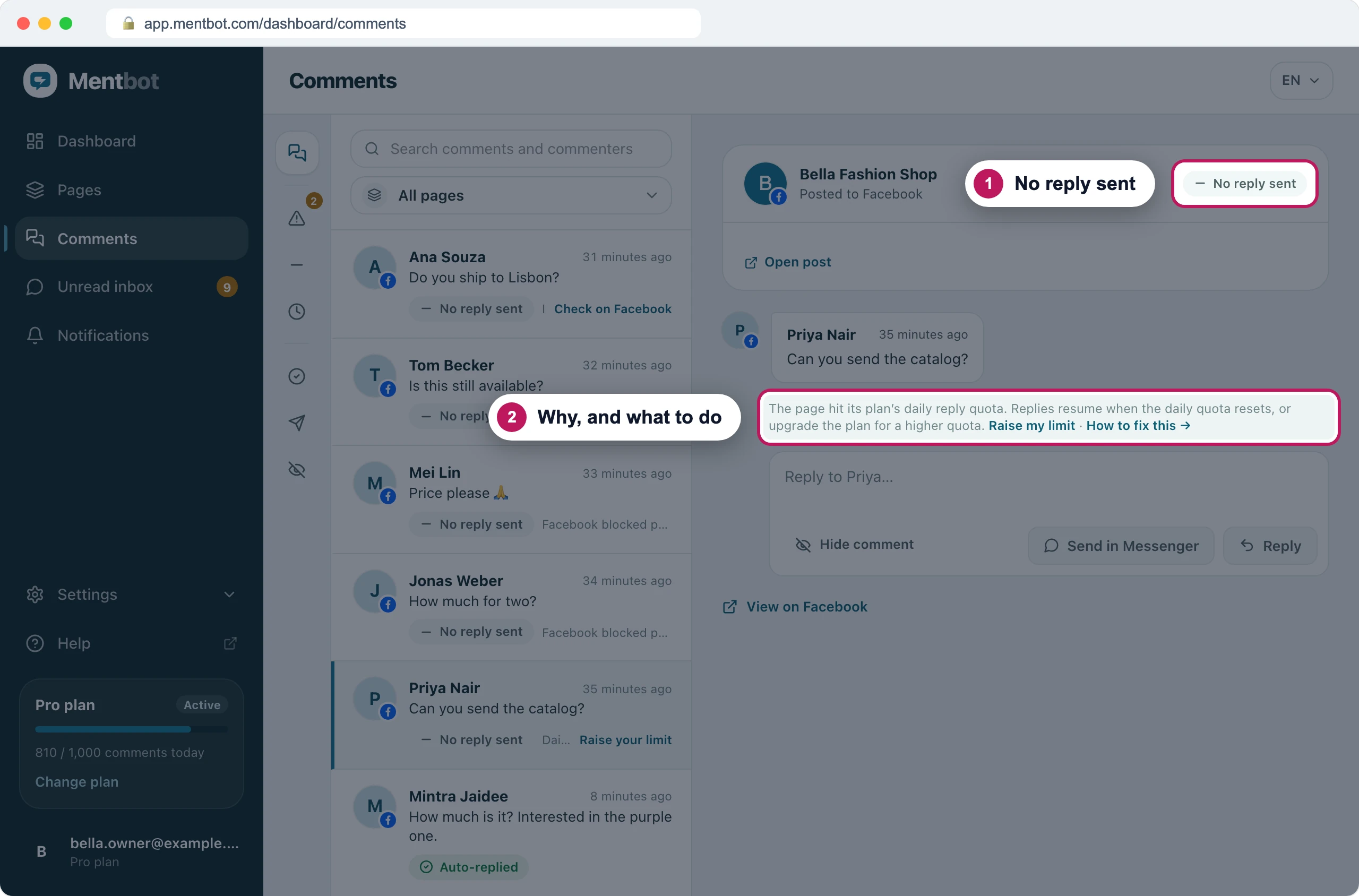
The list shows a short version of the same reason.
| The comment says | Section |
|---|---|
| Auto replies are off for this page | Auto replies are off |
| Text matched no keywords, Required hashtag missing, Post is not in the rule’s list, No rules on this page yet, Rule is off | No Rule matched |
| Already replied on this post | Already replied |
| Daily quota reached | Daily limit |
| No active membership | Plan ended |
| Facebook returned an error, Facebook blocked public replies on this page | Facebook refused it |
| Page owner not found, No page access | Connection lost |
| Auto first comment is off, No template selected, Template is empty | Auto first comment |
Catch up with Bulk reply
Bulk reply answers comments in No reply sent, up to 5,000 per run.
Fix the reason first: wait for the limit to reset, switch Auto replies on, choose a plan, or wait for a block to lift.
Open Comments and choose No reply sent.
Tick the comments, or tick the box at the top to select everything from the last 7 days.
Choose Run my rules to give each comment the reply its Rule would have sent. Or choose Write one message to send your own text to all of them.
Check What goes out and Daily limit, then press Send.
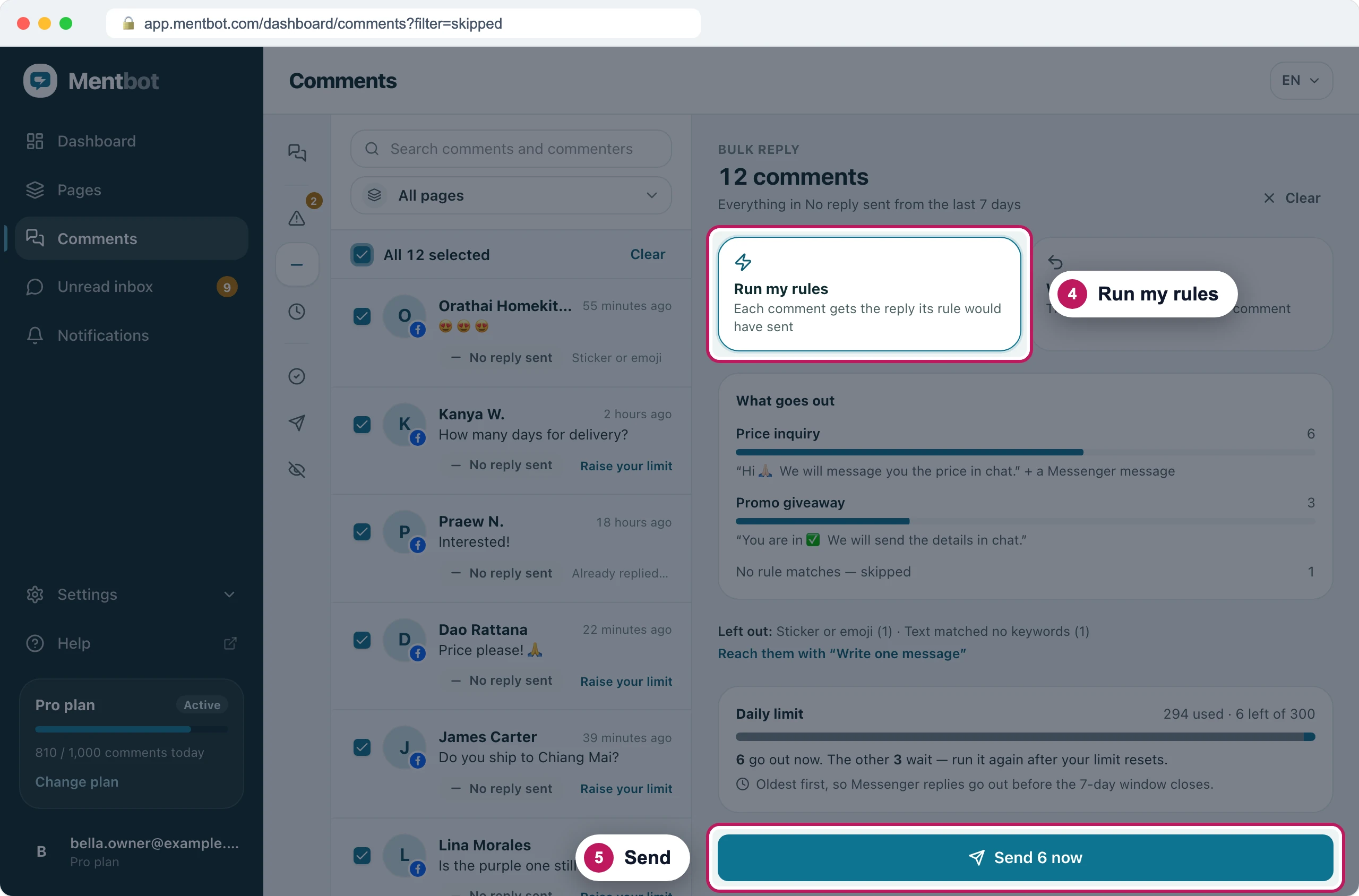
Six fit in today's limit. The other three wait for the next run.
- Run my rules only answers comments skipped for the daily limit, an ended plan, Auto replies off, a Facebook block, or a once-per-person Rule whose reply never reached them. It uses your Rules as they are now.
- It uses the daily limit like live replies. What doesn’t fit waits for you to run it again.
- It runs oldest first. Comments older than 7 days get the public reply only, because Facebook allows private replies for 7 days.
- It posts at most one public reply a minute on each Page. You can leave the page while it runs.
- It never answers a comment twice.
On Instagram
- The reasons and fixes are the same. A Rule’s hashtag is read from the post’s caption.
- Mentbot answers comments on the post, not replies inside a comment thread.
- Private replies are text only. A message switched to Image isn’t sent on Instagram.
If it still doesn’t work
The comment isn’t in Comments at all
Facebook never sent it to Mentbot. If the Page shows Not receiving comments, press Reconnect. Mentbot doesn’t list your Page’s own comments.
Still stuck? Use the chat in your dashboard, or email [email protected].