
Can Mentbot reply to DMs, send broadcasts or add buttons?
On this page
Mentbot answers comments, not messages. It replies under a comment and can send the commenter a private message, but it doesn’t answer messages sent to your Page, send broadcasts, or add buttons.
Replying to messages sent to your Page
Someone messaged your Page without commenting first, and nothing answered. Mentbot doesn’t answer those messages yet, but it lists the ones still waiting so you can answer them yourself.
Open Unread inbox. It lists the messages to your Facebook Pages that are still waiting for a reply, and how long each has waited.
Press the open icon next to a message to answer it in your Page’s inbox on Facebook, or press Open the page’s inbox to see them all there.
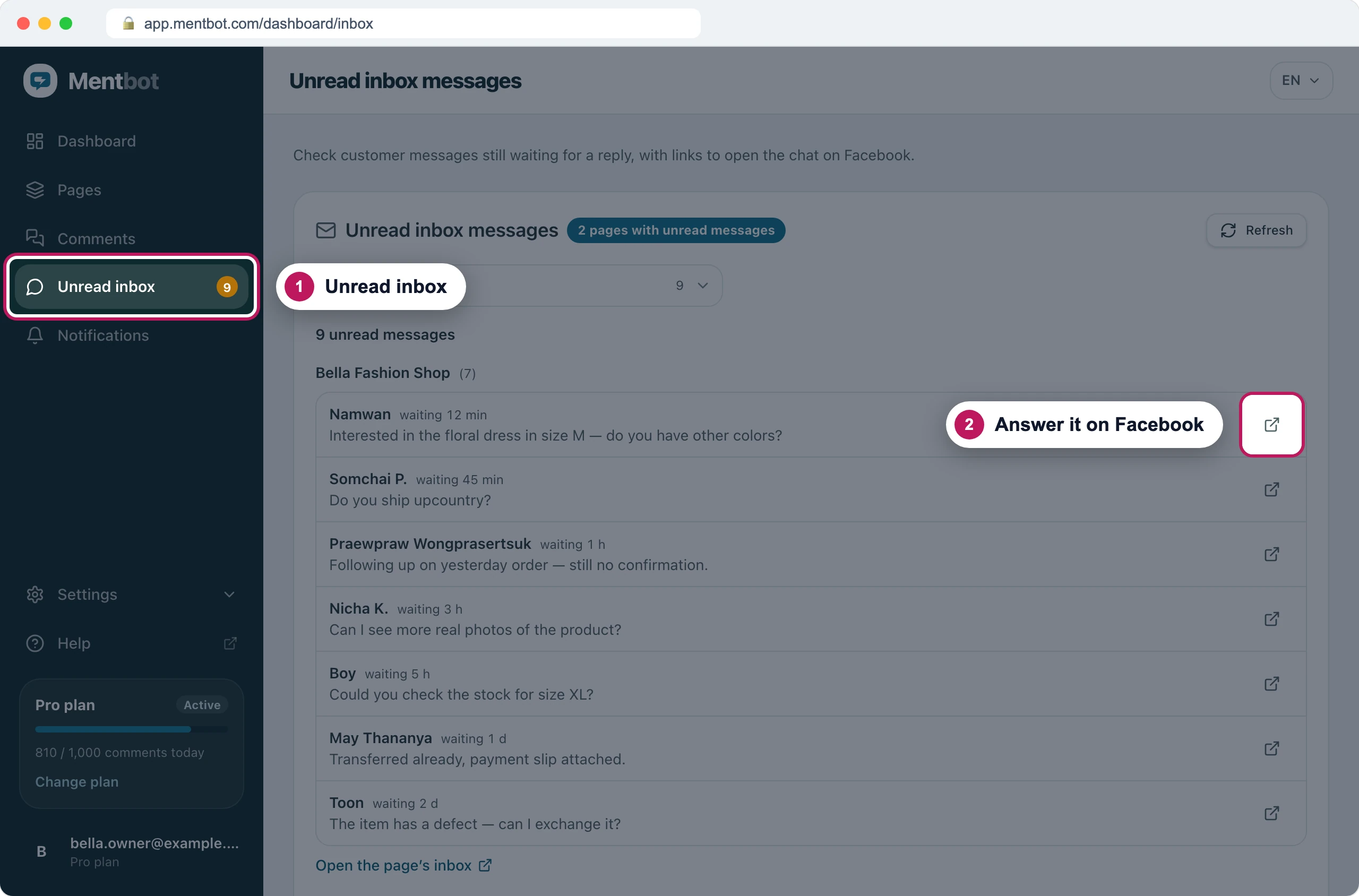
Every message still waiting for a reply, grouped by Page. To get a Telegram alert when a message has waited too long, set one up in Notifications.
To have Mentbot answer people for you, ask them to comment instead. Mentbot can send each commenter a message in Messenger: see Send a private Messenger reply when someone comments.
Sending a broadcast to all your followers
You want one message to reach everyone who follows your Page or has messaged it before. Mentbot can’t send that. Facebook only lets a Page message someone who wrote to it in the last 24 hours, or who commented on one of its posts in the last 7 days. Following the Page isn’t enough.
Reach many people through a post instead:
- Post something that asks people to comment a word, like “Comment INFO for the price list”.
- Add a Rule for that post that matches the word and sends a private reply. See Set up a Rule and Send a private Messenger reply when someone comments.
- Mentbot sends the message in Messenger to each person who comments.
Adding buttons to a message
You want a “Buy now” button or quick-reply choices under Mentbot’s message. Mentbot’s private replies are text or a single image, with no buttons or quick replies. A link in the text does the same job:
- In the Rule, write the message under Send a message to the inbox.
- Put the link on its own line after a short prompt, like “Order here:”. People tap it like a button.
- Press Save settings.
The full steps are in Send a private Messenger reply when someone comments.
On Instagram
An Instagram account connected through your Facebook Page works the same way: Mentbot replies to comments and sends private replies, but doesn’t answer messages, send broadcasts, or add buttons. Two things differ:
- Unread inbox and Telegram alerts cover Facebook Pages only. Answer Instagram messages in the Instagram app or in Meta Business Suite.
- Private replies are text only. A message switched to Image isn’t sent on Instagram.
If it still doesn’t work
A message I haven’t answered isn’t in Unread inbox
- Someone opened the chat in Facebook’s inbox. Facebook marks it read, and it leaves Unread inbox even if nobody replied.
- Your Page spoke last. A chat shows only while the customer’s message is the latest one.
- A Telegram group follows the Page. Unread inbox then shows only messages that have waited at least as long as that group’s alert time, and the note above the list says so.
- It was sent to your Instagram account. Unread inbox shows Facebook Page messages only.
I need Mentbot to answer messages sent to my Page
Email [email protected] and tell us what you would use it for. Requests from customers decide what we build next.
Still stuck? Use the chat in your dashboard, or email [email protected].